Beat Battles Effects Tier List
Spotlights versus flames, plus filter and delay categories — no invented FX names.
What counts as an effect on this list
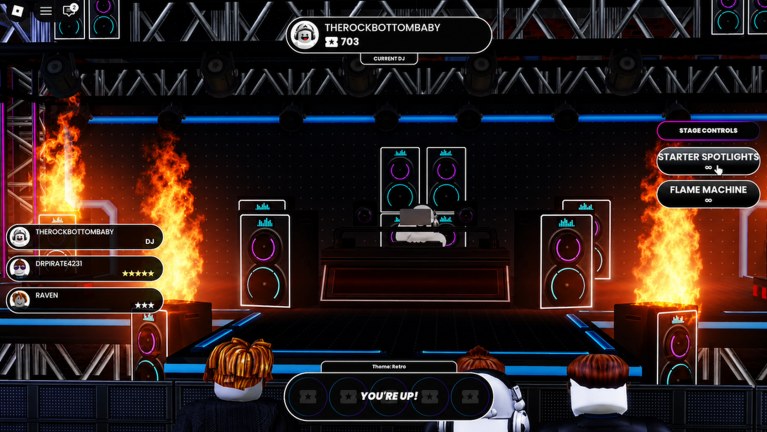
Beat Battles splits “effects” into two jobs that players mix up. Stage tools are the buttons on the Stage Controls panel during a battle. Musical FX are the sequencer lane labeled FX, plus any filters or delays you might add as the catalogue grows. This page ranks both as categories, not as fake SKUs. Confirmed stage tools in the live HUD are Starter Spotlights (key C) and Flame Machine (key G). We will not invent a named strobe pack or a legendary delay pedal to fill rows.
Read the catalogue version on Stage Effects. Use how to win battles for timing inside a set, and controls for the rest of the input map. Stage geometry that makes lights easier or harder lives on the stages tier list.
Ranking rules
- Readability first. If the crowd cannot find the Current DJ, the effect is too loud or pointed at the wrong place.
- Taste is allowed. Spotlights versus flames is a real preference. We still publish a default order so new players are not guessing.
- One job per tool. Lights show who is playing. Flames mark a hit. Filters clarify a loop. Delays decorate a transition. A tool that tries to do all four at once drops a rank.
- No invented names. Future unlocks enter as categories (filters, delays, extra stage machines) until Overtune labels them.
- FX lane spam is not S-tier. The sequencer already gives you an FX row. Filling it because it exists is how mixes die in a 25-player club.
S through C at a glance
| Rank | Item | Type | Default use |
|---|---|---|---|
| S | Starter Spotlights | Confirmed stage tool (C) | Keep the booth readable the whole set |
| A | Flame Machine | Confirmed stage tool (G) | Tap on the drop, release before the next verse |
| B | Filters (category) | Future / musical | Clean a muddy loop; do not auto-wah the kick |
| C | Delays (category) | Future / musical | Short throws on fills; long washes smear Drum and Bass |
| C | FX-lane spam | Sequencer habit | Extra hits that hide the groove |
These ranks assume the starter club stage: raised booth, side speakers, truss cans, flame columns already in the scenery. If a future stage already fills the frame with fire, Flame Machine drops toward B because you would stack the same idea twice.
S — Starter Spotlights
Spotlights are S because they solve the vote problem: who is playing? On a 25-player server people dance, talk, and glance at star rows. A lit booth answers the question without a word. The HUD places Starter Spotlights at the top of Stage Controls with a C prompt, which is a strong hint that Overtune considers this the default show tool, not a secret finisher.
How to play them at S:
- Turn them on when you become Current DJ, not three bars after the intro.
- Aim for the performer, not the back wall. The truss already paints the backdrop.
- Leave them available through the hook. Flickering every beat looks busy and reads as lag.
- If you wear a low-contrast mixer, spotlights are mandatory. They are the cheap fix the DJ decks tier list cannot give you.
Taste note: some DJs prefer a darker club and will call spotlights A. That is valid for screenshots. For stars, a visible DJ still outperforms a moody silhouette.
A — Flame Machine
Flame Machine is A, not S, because the starter stage already has flame columns left and right of the speakers. Pressing G adds more fire on top of scenery fire. Used on the drop, it is the best energy cue in the BETA. Held for the entire song, it hides the booth, washes Retro neon, and turns every bar into the same picture.
How to keep it A:
- Pair G with a musical hit: first chorus, bass drop, or the bar your Piano Roll hook lands.
- Release between hits so voters get contrast. Fire on / fire off is a rhythm. Fire always-on is wallpaper.
- Watch the pit. If your avatar disappears, you have over-ranked the tool for that camera.
- Do not use flames as a substitute for Drum and Bass. Heat is not a kick.
If your personal taste is spectacle-first, you can treat Flame Machine as S in your own sets. This list still publishes A so new players do not hold G from the YOU’RE UP banner to the last star.
B — Filters as a category
We have not confirmed a named filter collection in the shop. When musical filters show up — high-pass on an intro, a dull-to-bright sweep into the hook — rank the category as B: useful, easy to overdo, not a visual rank. Filters help when they make Drum and Bass easier to hear in a club. They hurt when they scoop the kick to make a loop sound “designed.”
Until a real SKU exists, practice the idea on arrangement instead: mute Guitar for four bars, bring it back, and you have already simulated a filter drop without a product name.
C — Delays as a category, and FX spam
Delays and the FX lane sit in C for battles. A short slap on a vocal stab or a one-shot can be charming. A long wash under the whole groove smears transients. In a room that already has speakers, flames, and 24 other avatars, smeared drums sound like a mistake, not a style.
FX-lane spam is the same rank for the same reason. The sequencer showing an FX row is not a quest to fill every clip. One transition hit is A-quality arrangement. Eight overlapping hits is C-quality noise. Lane priority on the Tier List Hub already puts Drum and Bass over FX; this page is the effect-shaped version of that rule.
Timing with YOU’RE UP and Retro
The battle HUD shows YOU’RE UP! and a theme example, Retro. Effects should follow both:
- On YOU’RE UP, hit Starter Spotlights immediately so the crowd’s first frame is you.
- Save Flame Machine for the first moment the Retro groove actually drops, not the walk-up.
- If you add musical FX, keep them short enough that the theme still reads as a club track, not an ambient bed.
Controls for these prompts belong with the rest of the input guide on controls. Do not bind your whole personality to G.
Upgrade priority
- Master C and G on the starter stage. They are already unlocked in the screenshot.
- Spend gems on loops, not on wishing for extra machines. Confirmed shop rows are loop boxes and a full pack crate.
- When production unlocks more effects, slot them into S–C with the same tests: does the crowd see you, does the kick survive, does the tool have one job?
- Never promote a new effect above Starter Spotlights until it does a better job of pointing at the DJ.
Related pages
Use Stage Effects for the confirmed tool list, how to win battles for a full set flow, stages tier list so you do not double-stack flames on a fiery room, and controls so C and G are muscle memory. If a clip of your set looks hotter than it sounds, demote Flame Machine one band for the next queue and put the gems back into Drum.
Frequently Asked Questions
Quick answers for remixing, voting, and climbing Beat Battles billboards.
Is Flame Machine S-tier in Beat Battles?
Default rank is A. The starter club already has flame columns, so holding Flame Machine (G) the whole song hides the booth. Tap it on drops. Starter Spotlights rank S because they help voters find the Current DJ.
What stage effects are confirmed?
Starter Spotlights and Flame Machine, shown on the Stage Controls panel. We do not add extra named machines. Catalogue notes are on Stage Effects.
Do you rank named filters or delay pedals?
No. Filters and delays are ranked as future categories, not fake SKUs. If Overtune ships a real name, it will get its own row. Until then, keep musical FX short so Drum and Bass stay clear.
Should I fill the FX sequencer lane every bar?
No. That is C-tier habit. Use one or two hits at transitions. Lane priority still favors Drum and Bass. See the Tier List Hub for the full lane order.
When do I press C and G?
C (Starter Spotlights) when you become Current DJ. G (Flame Machine) on the drop, then release. Practice the timing in how to win battles and the key list on controls.
Do new stages change these effect ranks?
Yes. If a room already overflows with fire, Flame Machine drops. If a room is dark, Spotlights matter even more. Recheck the stages tier list before you copy a friend's G spam.