Beat Battles Stage Effects
Starter Spotlights (C) and Flame Machine (G), documented from the live Stage Controls panel.
Confirmed tools (nothing invented)
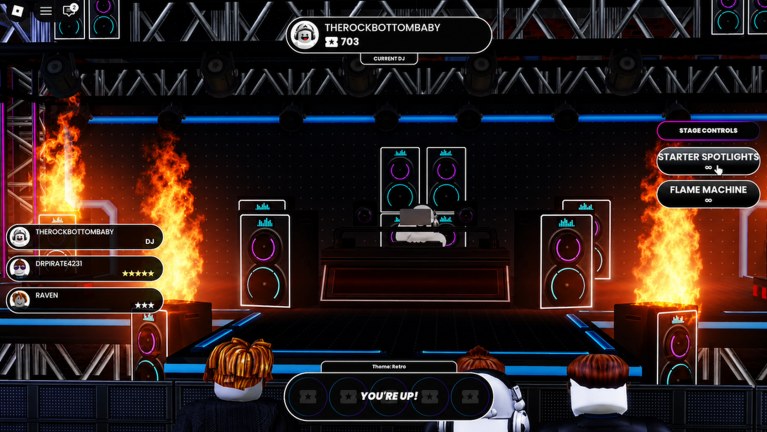
The battle HUD puts a Stage Controls panel on the right while you perform. Two rows are visible and labeled:
- Starter Spotlights with a C prompt
- Flame Machine with a G prompt
Those are the confirmed stage effects in this BETA snapshot. Official copy also says you unlock new effects as you level production. This page will add rows when the client shows them. It will not invent strobe packs, fog canons, or named delay pedals to look complete.
Musical FX are a separate idea: the sequencer has an FX lane next to Drum, Bass, Guitar, Piano Roll, Keys, and Synth. That lane is arrangement, not a Stage Controls button. Keep the two ideas apart so you do not buy the wrong thing.
Ranks (spotlights S, flames A, filter/delay categories B/C) live on the effects tier list. Keybind context for the rest of the studio is on controls. Set timing is on how to win battles.
Starter Spotlights
Spotlights are the default show tool. C is the top prompt, which matches how you should think about them: turn the performer on before you decorate the drop.
What they are for:
- Point the lighting truss at the DJ so the pit can see who is Current DJ.
- Keep the backpack mixer readable against a black booth.
- Give Retro (and any later theme) a human center instead of a wall of neon.
What they are not for:
- A panic button when the mix is empty.
- A strobe you tap every beat until it looks like lag.
- A replacement for Drum and Bass.
On the starter club the truss already hangs over the booth. Spotlights have somewhere to land. If you walk into a darker future stage, spotlights become even more important. If you walk into a room that is already blinding, still use them as a cue that you are the performer, then stop adding extra flash.
Flame Machine
Flame Machine is the burst. G sits under spotlights on the panel. The starter stage already has scenery flames outside the speaker stacks. The button is extra fire on top of that scenery. That is why holding G for a whole song is a poor default: you stack the same picture until the booth disappears.
Use it as a hit:
- Press on the bar the groove actually drops, or on the bar your Piano Roll hook lands.
- Release so the next section can be darker and readable again.
- Watch the pit camera. If your avatar is gone, you overdid it.
Taste is allowed. Some DJs want a wall of fire the entire Retro night. That is a valid look and a weaker vote look. Document both, then pick per set. The effects tier list publishes A for Flame Machine so new players do not treat G as a toggle that stays down.
Stage Controls during YOU’RE UP
The bottom banner reads YOU’RE UP! when the server expects a set. A clean order that does not fight the HUD:
- Confirm you are Current DJ on the top chip.
- Hit Starter Spotlights (C) so the first crowd frame is lit.
- Start the remix that matches the theme (Retro in the reference shot).
- Tap Flame Machine (G) on the first real hit, not on the walk-up.
- Leave enough quiet visuals that the next DJ inherits a readable booth.
If you cannot find C and G in the moment, drill them on controls before you queue again. Stage tools are worthless if you discover the panel after the drop has passed.
Future effects as categories, not SKUs
When production unlocks more effects, slot them by job:
- Extra lights that point at the DJ belong next to Starter Spotlights.
- Extra pyro or particles belong next to Flame Machine and should pass the same “does the booth survive?” test.
- Filters (if they appear as musical or stage FX) belong in a clarify-the-mix job.
- Delays belong in a decorate-a-transition job and should stay short in a club.
We will not name those products early. If a friend shares a screenshot of a new Stage Controls row, that screenshot is the source, not a rumor title.
Effects versus the FX sequencer lane
| Kind | Where it lives | Job |
|---|---|---|
| Starter Spotlights | Stage Controls (C) | Show the performer |
| Flame Machine | Stage Controls (G) | Mark a drop |
| FX lane clips | Sequencer | One-shot hits and transitions in the arrangement |
| Filters / delays | Not confirmed as named SKUs | Clarify or decorate audio if they ship |
Filling the FX lane because you unlocked “effects” is a category error. The lane can stay almost empty on a winning set. Stage buttons can stay almost idle on a winning set too if the remix is obvious and the booth is already lit by the truss. More is not a quest.
How effects unlock next to other catalogue gear
Same production climb as DJ decks and Stages: make tracks, perform, level production, climb billboards. Gems in the shop buy loops, not a confirmed extra machine. Do not dump a Full Pack Crate hoping a new Stage Controls row falls out.
After you own another effect, test it on the starter club first. That room already has truss, side flames, and a pit camera. If the new tool hides the DJ there, it will hide the DJ everywhere. Then take a real vote night using how to win battles and keep the tool only if stars do not fall.
The honest end state for this page is small: two confirmed buttons, a warning not to invent more, and a pointer at the pit. Everything else is BETA fog. Play the tools that exist.
Frequently Asked Questions
Quick answers for remixing, voting, and climbing Beat Battles billboards.
What stage effects are confirmed in Beat Battles?
Starter Spotlights (C) and Flame Machine (G) on the Stage Controls panel. Scenery flame columns on the starter club are part of the room, not a third button. We do not list invented machines.
Is the sequencer FX lane the same as Stage Controls?
No. The FX lane is arrangement inside the studio. Stage Controls are live show tools during a battle. You can win with a nearly empty FX lane if Drum, Bass, and lights are clear.
When should I press C and G?
C when you become Current DJ so the booth is lit. G on the drop, then release. Full set flow is in how to win battles. The rest of the input map is on controls.
Do I need to unlock Flame Machine?
The reference HUD already shows it on Stage Controls, so treat it as available on the starter stage. Later production unlocks may add more effects; they are not required to play tonight.
Where are effects ranked?
On the effects tier list. Default order is Starter Spotlights above Flame Machine for voter readability, with filters and delays as future categories.
Will a new stage change how these tools feel?
Yes. A fiery room makes extra Flame Machine easier to overdo. A dark room makes spotlights mandatory. Recheck Stages when you swap rooms.