Beat Battles Unlocks Hub
Decks, stages, effects, loops, and billboards — what each bucket is, and what to buy first.
What this catalogue covers
Beat Battles is a free Roblox BETA from Overtune (Iceland): remix loops in a studio, then battle on stage in servers of up to 25 players. Official unlock language is broad and we keep it that way. You unlock DJ decks, stages, and effects, you expand the music catalogue, and you level production to climb the billboards. This hub is the index for those buckets. It does not invent crate names, deck SKUs, or secret passes.
Use the child pages when you need depth:
- DJ decks — the backpack mixer on your avatar.
- Stages — booth, speakers, lighting truss, crowd, HUD.
- Stage Effects — confirmed Starter Spotlights and Flame Machine.
- Loops and Shop — exact gem rows and efficiency math.
- Gems and Currencies — purple gems versus the cassette/tape counter, and what not to buy in hour one.
Ranks (starter versus unlocked, spotlights versus flames, lane priority) live on the Tier List Hub, not here. This hub answers what exists and what to spend first.
The four catalogue buckets
DJ decks
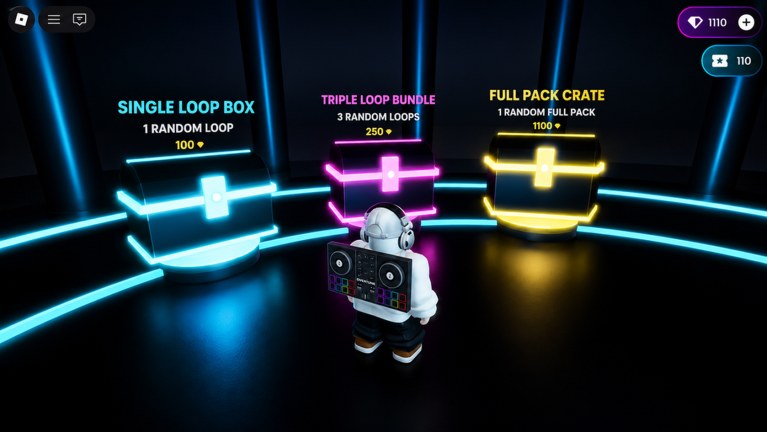
A deck is the mixer you wear. In the loop shop screenshot it sits on the avatar’s back: two platters, a pad grid, headphones. Other players read that silhouette when you walk the club. Unlocks in this bucket are identity plus visibility. They are not confirmed to add sequencer lanes or change shop prices. Production level is the official climb that opens new decks.
Stages
A stage is the room you perform in. The documented starter club has a raised booth, stacked crown-logo speakers, a lighting truss, flame columns at the sides, and a pit for voters. Battle HUD chips show Current DJ, star rows, a theme such as Retro, and YOU’RE UP. Later stages should be judged as rooms, not as stat sticks.
Effects
Confirmed stage tools are Starter Spotlights (C) and Flame Machine (G) on the Stage Controls panel. Musical FX also exist as a sequencer lane. Future filters or delays, if they ship, belong in this bucket as categories until they have real names.
Loops and catalogue
The music catalogue grows with shop rolls. Confirmed gem prices:
- Single Loop Box — 100 gems, one random loop
- Triple Loop Bundle — 250 gems, three random loops
- Full Pack Crate — 1100 gems, one random full pack
Cassette currency appears next to gems on the same HUDs. We do not invent cassette SKUs. Codes are not a confirmed catalogue shortcut; see Codes.
Production level and billboards
Official copy tells you to level production and climb billboards. That is the long game: more decks, more rooms, more effects, a deeper catalogue, public proof that you keep finishing tracks. It is not a reason to skip the first remix. A billboard climb that starts with empty Drum and Bass is just a slower shop.
Practical split:
- Gems buy loops (and only the shop rows we can see).
- Production unlocks the wearable and room catalogue over time.
- Stars come from other players on stage, not from owning a crate.
If a system is not on that list — a fake battle pass, an invented legendary deck — it does not belong in your plan.
Gem-first upgrade order
- Join a server and finish one remix with Drum and Bass filled. Getting Started covers the first session.
- Open the shop only after you know which lane is empty. Triple Loop Bundle is the efficient volume buy; Single Loop Box is the cheap extra roll; Full Pack Crate waits until 1100 gems will not stall the set. Math is on Loops and Shop.
- Learn Starter Spotlights and Flame Machine on the starter stage before you hunt extra effects.
- Let production hand you decks and stages. Equip them if they stay readable.
- Check Codes on the off chance a drop appears. None are confirmed in this BETA snapshot.
This order keeps you playing. A catalogue you never take on stage is a museum.
What we will not list
- Named decks, stages, or effect SKUs that are not in the client.
- Fake rarity colors.
- Cassette prices we have not seen on a shop row.
- “S-tier neon” anything. If you want ranks, open the tier list.
- FNF characters, arrow skins, or tap-note ratings. This is not that game.
When Overtune publishes a real name, it will land on the matching child page first, then on a tier list row if it changes decisions.
How the hub connects to battles
Unlocks are support gear for a remix contest. The sequencer still has seven lanes: Drum, Bass, Guitar, FX, Piano Roll, Keys, Synth. The stage still asks you to match a theme and collect stars. A new backpack does not skip those jobs. After you know which bucket you are shopping, jump back to performance notes so the purchase has a use the same night.
If you are here because the shop looks expensive, start with Loops and Shop. If you are here because the booth looks empty, start with Stages and Stage Effects. If you are here because you want the avatar to read as a DJ, start with DJ decks. Then spend the next session on stage, not in the crate ring.
Frequently Asked Questions
Quick answers for remixing, voting, and climbing Beat Battles billboards.
What can you unlock in Beat Battles?
Official buckets are DJ decks, stages, effects, a larger music catalogue, and billboard progress as you level production. Confirmed shop rows are loop boxes and a full pack crate. We do not list invented SKUs.
Should I buy loops or wait for production unlocks?
Buy loops first if Drum or Bass is empty. Production unlocks dress the avatar and the room over time. Stars come from the remix, not from a mixer you have not earned yet. See Loops and Shop.
Are there codes that unlock decks or stages?
None are confirmed. Bookmark Codes for the first real drop. Do not treat this hub as a code list.
Where are the tier ranks for these unlocks?
On the Tier List Hub and its sub-pages. This Unlocks Hub is the catalogue: what each bucket is, how gems and production differ, and which child page to open.
Is Beat Battles a character roster like other Roblox wikis?
No. There is no fighter list. "Players" on this wiki means unlocks you wear or perform with: decks, stages, effects, and loops.
What currency does the shop use?
The documented crate rows cost gems: 100, 250, and 1100. Cassette currency also appears on the HUD. We do not invent cassette prices until a row shows them.