Beat Battles Stage HUD Guide
Current DJ, YOU'RE UP, Retro, stars, and Stage Controls — read the room before you play.
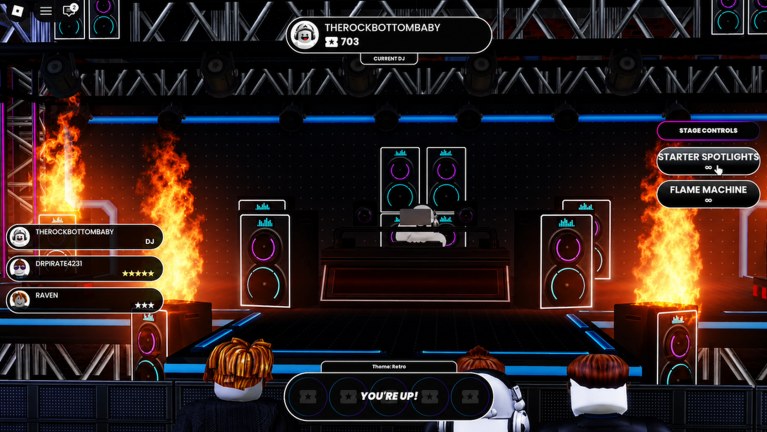
The stage HUD is the performance scoreboard on a Beat Battles server. It is not a second sequencer and it is not a tap-arrow highway. While you wait in the pit of a 25-player room, the chrome tells you who is Current DJ, what the theme is, whether the queue has reached you, how stars are landing, and which Stage Controls you can fire. This page is a readout of that chrome. Input maps and studio widgets live on Beat Battles Controls. Crowd habits live on how to win battles. Voting as a job, not an afterthought, lives on how to vote.
Same studio engine, different room
Overtune’s sequencer is the same family of tool the studio shows outside Roblox. Lanes still read Drum, Bass, Guitar, FX, Piano Roll, Keys, and Synth. The clip on this page is an official Overtune sequencer video — the same engine talking to a desktop workflow. Watch it as proof that Beat Battles is a real music studio dropped into a club, then put the desktop advice down. You are not mixing in Audacity when YOU’RE UP flashes. You are on a Roblox stage with a crowd assigning stars.
The useful transfer from that engine clip is small: pick a lane on purpose, hear the stack, stop adding ornaments when the idea is obvious. The rest of this article is the Roblox HUD that sits around that engine during a battle. If a box on the HUD fails, run the remix checklist in the studio before you queue again.
Current DJ and the cassette chip
The top chip names the Current DJ. That is whose set is filling the room right now. Read it before you fire anything. If the name is not yours, you are in the audience. Stage Controls still exist on the panel, but the social contract is to watch and vote, not to light the booth for someone else’s drop.
The same chip area shows a cassette or tape count next to the name. The battle screenshot shows 703. That counter is the same cassette currency you see in the shop (110 in the shop shot). It is not a star score and it is not a crate price. Do not treat a high tape number as proof that the Current DJ is winning. Stars are the vote. Cassette is a wallet.
If you cannot find the Current DJ chip, you are not ready to queue. The pit camera can be busy: stacked speakers, flame columns, a lighting truss, 24 other avatars. The chip is how the server tells you who owns the set when the silhouette is messy.
Theme chip and YOU’RE UP!
Along the bottom, the HUD posts a theme. Retro is the example this wiki can name without inventing a playlist. Matching that chip is the fastest vote you can win without writing a new hook. A clean trap pack on a Retro call is a miss even if the loops were expensive. Theme is a constraint. It is not wallpaper.
YOU’RE UP! is the banner that your queued set is now the one being judged. It is not a suggestion to keep rearranging Guitar. If you are still opening shop under that banner, you queued a draft. The studio is where you finish 8-16 bars. The stage is where you play them.
A clean order:
- Read the theme before you queue, and again while you wait.
- Watch one full Current DJ set as research.
- When YOU’RE UP! hits, play the stack you already have.
- Leave the banner. Vote the next DJ.
Details of what to do with the set itself — front-load energy, keep it short — sit on how to win battles. This page only insists that YOU’RE UP! is a perform prompt, not a remix prompt.
Star list on the left
The left side of the battle HUD lists players with star counts. That is the live vote, not a rhythm accuracy meter. Stars appear next to names in the pit list. Part of the audience is watching the booth; part of it is watching this list. Your job as Current DJ is to be obvious in both.
Read the star list while you are not up. Note whether stars jump on the first bars or stall until a late drop. That is how you learn that timid intros lose. When you are up, do not stare at your own row until the mix falls apart. Play the stack, then look.
Voting is its own habit. A 25-player server notices who never stars a set they heard. Walk through the social half on how to vote so this list is something you write to, not only something you chase.
Stage Controls: Starter Spotlights and Flame Machine
The right panel is Stage Controls. Two labeled rows in this BETA snapshot:
- Starter Spotlights with a C prompt
- Flame Machine with a G prompt
They are show dressing. They are not extra sequencer lanes and they are not a vote hack. Spotlights keep the Current DJ readable against a black booth and a lighting truss. Flames mark a drop or a hook return. Fire spotlights when you become the performer so the first crowd frame is lit. Tap flames on the first real hit, then release so the booth survives.
Spamming both on bar one looks busy and still does not add a kick. Leaving flames on for a whole rambling repeat hides the DJ the stages tier list is trying to keep readable. Longer effect unlocks — the catalogue you climb with production — live on stage effects. Day-one HUD literacy only needs C and G, used once, on purpose.
Scenery flame columns on the starter club are part of the room, not a third button. Do not confuse the architecture with the G prompt.
A HUD pass you can run in one queue
Use this as a tool, not as lore.
- From the pit, read Current DJ. If it is not you, you are voting.
- Read the theme chip. Retro or otherwise, that is the room.
- Glance at the star list so you know how fast this crowd decides.
- Confirm Stage Controls still show Starter Spotlights and Flame Machine before you need them.
- When YOU’RE UP! hits, hit C, play the finished stack, tap G on the drop, stop.
- After the set, stay on the HUD and star the next DJ.
If any of those widgets is a mystery, go back to Beat Battles Controls for studio versus stage, then to the remix checklist if the music was the hole. The sequencer engine on the video is how you build. The stage HUD is how a 25-player Roblox club hears that build. Learn the chrome so you are not hunting menus while the theme clock is running.
Frequently Asked Questions
Quick answers for remixing, voting, and climbing Beat Battles billboards.
What should I read on the Beat Battles stage HUD first?
Current DJ, the theme chip (Retro is the named example), YOU'RE UP!, the star list, then Stage Controls. Full widget names for studio versus stage sit on Beat Battles Controls.
What does YOU'RE UP! mean?
Your queued set is now the one being judged. Play the stack you already finished. Do not remix live. Stage craft after the banner is on how to win battles.
How do Starter Spotlights and the Flame Machine show on the HUD?
They are the two labeled Stage Controls rows: Starter Spotlights (C) and Flame Machine (G). Spotlights for visibility, flames for a drop. Unlock catalogue notes are on stage effects.
Are star rows a rhythm accuracy meter?
No. Stars are crowd votes on a 25-player server. Learn the habit on how to vote. Readable rooms that help those votes land are ranked on the stages tier list.
Why is there an Overtune sequencer video on a HUD page?
The clip is the same studio engine in a desktop workflow. Use it as context, then come back to Current DJ, YOU'RE UP!, and Stage Controls. Arrangement holes still go through the remix checklist.
Is the cassette number next to Current DJ a score?
No. It is the cassette or tape wallet, also shown in the shop. Stars on the left list are the vote. Cassette is not a crate price and not a win meter.