Beat Battles Stages Tier List
Starter club stage first: booth, speakers, truss, flames, and whether voters can see you.
What a stage rank means here
Beat Battles stages are the rooms you perform in, not maps with secret buffs. The crowd assigns stars while you are Current DJ. If they cannot see the booth, they cannot connect the music to a person, and the vote turns into background noise. This list ranks stages by voter readability: lighting, crowd sightlines, and whether the DJ silhouette survives the light show.
We do not invent arena names. Official language unlocks “stages” as a category while you level production. The one layout we can document from a real HUD screenshot is the starter club stage with flames, stacked speakers, and a lighting truss. Future stages get band ranks (readable theme rooms versus spectacle rooms) until they have real names.
For anatomy of the booth, speakers, and HUD chips, use the Stages catalogue. For how to play the set, use how to win battles.
Readability tests (use these on every room)
Before you call any stage S-tier, stand in the pit and check:
- Booth height. Is the DJ on a platform above the crowd, or lost on the floor between legs?
- Speaker sightlines. Do the stacks frame the mixer, or block the avatar from the left and right seats?
- Lighting truss. Are the cans pointed at the performer, the backdrop, or both? Performer light helps votes. Backdrop-only light makes a silhouette.
- Flame placement. Columns outside the booth (as on the starter stage) add energy. Flames in front of the mixer hide the Current DJ.
- HUD overlap. Can you still read Current DJ, star rows, theme, and YOU’RE UP without the scenery eating the UI?
- Theme contrast. A Retro night with neon speaker rings is readable. A theme that paints the whole room the same value as your hoodie is not.
Fail two or more tests and the stage drops a band, even if it looks expensive in a lobby preview.
S — Starter club stage (flames and speakers)
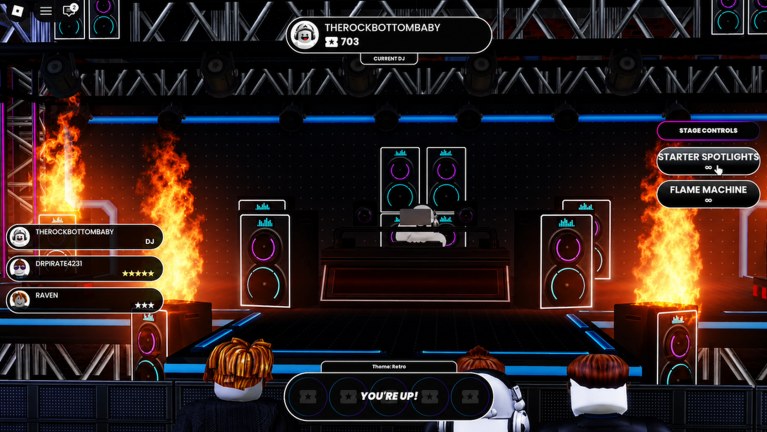
The live battle screenshot is the reference. Raised black platform, DJ booth in the center, stacked speakers with crown logos and cyan or magenta rings on both sides, flame columns just outside those stacks, a lighting truss with multiple cans across the ceiling, and a crowd in the pit close enough to see faces. Left HUD lists players and star counts. Top chip shows the Current DJ. Bottom banner shows the theme (example: Retro) and YOU’RE UP! Right panel lists Stage Controls.
Why this room is S for a BETA list:
- The booth is the brightest, highest object in the composition. Voters do not hunt for the DJ.
- Speakers create a frame, not a wall. From the pit camera, you still see the mixer and the avatar.
- Flames sit beside the kit. They mark a drop without standing between the crowd and the performer.
- The truss lights the deck from above, which helps Starter Spotlights do their job instead of fighting a dark cave.
- Retro as a theme already matches the neon rings. You are not fighting the wallpaper.
If you only ever perform here, you are not behind. You are on the most documented, most readable stage in the current client. Unlocking another room is optional flavor until it beats these sightlines.
A — Future stages that keep the pit-to-booth line
When production level unlocks more stages, park them in A if they copy the starter club’s homework: raised booth, speakers as a frame, lights on the DJ, effects to the sides. A theme room that still lets the crowd see platters on your backpack (see the DJ decks tier list) belongs here.
A-tier is also where a slightly tighter club can live — smaller pit, closer voters, same lighting logic. Closer cameras help stars if the mix is good. They punish you if Flame Machine washes the lens. Pair the room with the effects tier list so you do not over-fire G in a small box.
B — Spectacle stages
B-tier rooms win screenshots and lose silhouettes. Extra particle walls, giant backdrops, or floor LEDs that compete with the booth make the Current DJ chip do all the work. Fun for a lobby tour. Weak for a one-song vote when 25 people are talking, dancing, and glancing at the HUD.
If you pick a spectacle stage, compensate: keep Starter Spotlights on the performer, tap Flame Machine only at the drop, and wear the highest-contrast mixer you own. You are climbing out of a visual hole the room created.
C — Unreadable or unconfirmed layouts
C is for any stage where the crowd cannot see the booth without camera tricks, plus every unnamed layout people will invent in Discord. We will not add ghost names to fill a table. A dark warehouse with no truss, a giant FX wall in front of the mixer, or a skybox that swallows the avatar all belong here until a patch changes the geometry.
Theme: Retro as a worked example
The HUD labels the battle Theme: Retro. That is a constraint, not a wallpaper pack you ignore. Retro rewards:
- Drum and Bass that actually groove instead of cinematic drones.
- Neon-readable staging (the starter club already does this).
- Effects that feel like a club: spotlights on the DJ, flames on the hit, not a delay wash that turns the kick to soup.
If a future theme is calmer, drop Flame Machine in the mix and lean on spotlights. If a future theme is harsher, protect the booth silhouette even more. Theme and stage rank together; a perfect room with a mismatched set still dumps stars.
Crowd sightlines and star voting
Stars appear next to names in the pit list. That means part of the audience is watching the stage while another part is watching UI. Your job is to be obvious in both:
- Obvious in the world: booth, mixer, lights.
- Obvious in the HUD: you are Current DJ, you are up, your set matches the theme.
A stage that hides the avatar forces everyone onto the HUD. That is a weaker memory. People vote for the set they can picture. Readable rooms create that picture.
Upgrade priority for stages
- Learn the starter club until you can hit C and G without looking away from the mix.
- Win a few star rows there. If you cannot win on S-tier sightlines, a new room will not save you.
- Spend gems on loops, not on wishing for a different building. Shop rows are loop boxes and a full pack crate.
- When production offers a new stage, run the six readability tests. Equip it only if it ties or beats the starter club.
- Never rank a stage above the remix. Empty Guitar sparkle in a pretty room is still a C set.
Related pages
Read Stages for the booth, truss, and HUD labels, effects tier list for spotlight versus flame choices, and DJ decks tier list so the backpack still pops in the room you picked. Then take the whole package into how to win battles. If the pit still cannot find you, the rank of the stage is the first thing to demote — not the last.
Frequently Asked Questions
Quick answers for remixing, voting, and climbing Beat Battles billboards.
What is the best stage in Beat Battles?
The starter club stage with a raised booth, crown-logo speakers, lighting truss, and side flame columns. It is the most readable room we can document. Future unlocks must beat those sightlines before they outrank it.
Do you list named stages like arenas or neon clubs?
No. We do not invent SKUs. Official unlocks include stages as a category. This page ranks the starter club from the real battle HUD and groups future rooms by readability.
How does the Retro theme change the stage rank?
Retro is a battle theme, not a separate map name. The starter club already has neon speaker rings that fit it. Pick lights and loops that match the theme rather than hoping a different building will do the work.
Should I unlock a new stage before new effects?
Usually no. Starter Spotlights and Flame Machine already exist on the starter stage. A new room that hides the booth is a downgrade. See the effects tier list and Stages before you swap.
Why do crowd sightlines matter more than decorations?
Stars come from people in the pit. If speakers or flames block the DJ, voters hear a track with no performer. Readable geometry turns a remix into a memory they will actually rate.
Where do I practice on the starter stage?
Queue a set, watch the Current DJ chip, and use how to win battles for timing. Confirm your mixer still reads with the DJ decks tier list.