Beat Battles Stages
Booth, speakers, truss, pit, and the battle HUD — how the club is built.
What a stage is in Beat Battles
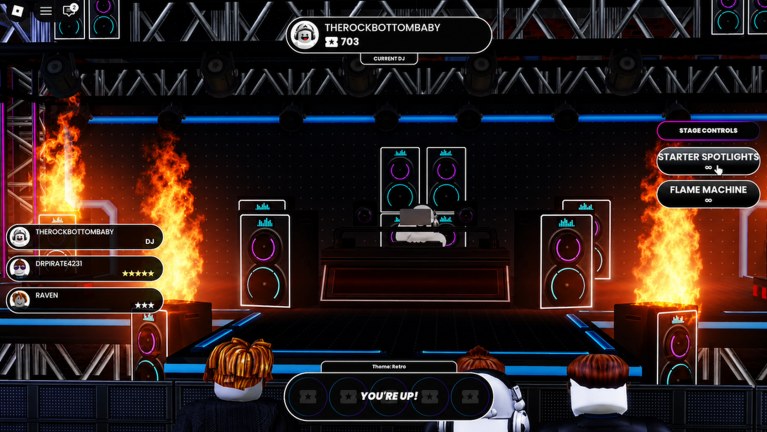
A stage is the club you perform in while the server watches. It is not a PvP map and it is not a rhythm highway. You walk up as Current DJ, the crowd sits in a pit, and stars appear next to names as people vote. Official unlocks include new stages as you level production. This page documents the starter club from a real battle HUD and explains the pieces you should look for on any later room. Ranks (readable versus spectacle) sit on the stages tier list.
Starter club anatomy (from the live HUD)
The battle screenshot is the ground truth for this BETA snapshot.
Booth
Center platform, raised above the pit, black floor with a thin light edge. The DJ stands at a small booth between the speaker stacks. That height is the whole trick: voters can find you without a camera cut. If a future stage puts the performer on the same plane as the crowd, the booth has failed its job.
Speakers
Stacked cabinets on both sides of the booth, each with a crown logo and a neon ring (cyan on some faces, magenta on others). They frame the DJ instead of covering them. From the pit you still see the avatar and the backpack mixer. Speakers also sell the idea that this is a club, which matters when the battle theme is something like Retro.
Lighting truss
A metal grid over the stage holds multiple cans aimed down. This is why Starter Spotlights have a surface to work with. A room with no truss forces you to light the DJ with scenery only, which is harder. Look up before you call a new stage an upgrade.
Flame columns
Real fire sits outside the speaker stacks, left and right, not in front of the mixer. That placement is scenery energy. The separate Flame Machine tool on Stage Controls is an extra burst you time yourself. Do not confuse the room’s columns with the button. Details on the button are on Stage Effects.
Crowd pit
Avatars stand close, facing the booth. The camera in the screenshot is over their shoulders. That is the vote seat. If you only preview stages from a wide lobby fly-cam, you will miss blocked sightlines that pit voters actually have.
Battle HUD that lives on the stage
The room is only half the interface. The HUD tells the server what the stage is doing:
- Current DJ chip at the top, with a cassette count next to the name. In the reference shot the performer is labeled Current DJ.
- Star rows on the left, under player names. That is the live vote.
- Theme along the bottom (example: Retro).
- YOU’RE UP! banner when it is your set.
- Stage Controls on the right: Starter Spotlights (C) and Flame Machine (G).
A good stage keeps these chips readable. A busy backdrop that camouflages the YOU’RE UP banner is a UI problem as well as a scenery problem. Learn the prompts in how to win battles so you are not hunting menus while the theme clock is running.
Themes are constraints, not wallpapers
Retro is the confirmed example on the HUD. The starter club already looks like a neon night: speaker rings, cyan floor edges, magenta truss glow. Your remix should meet the theme halfway. A cinematic ambient bed on a Retro night fights the room. Drum and Bass that actually move fit the speakers you are standing between.
When more themes appear, walk the stage first. Ask whether the booth still contrasts, whether flames still read as accents, and whether your backpack mixer (see DJ decks) still looks like a mixer. Theme plus geometry is one package.
How stage unlocks likely work
Same pipe as other official unlocks: level production, expand the catalogue, climb billboards, unlock stages. There is no confirmed gem crate that sells a named arena. Gem rows we can see are loop boxes and a full pack crate. Do not park 1100 gems on a room you have not been offered.
When a new stage does unlock:
- Stand in the pit, not in the booth, and screenshot the DJ.
- Check booth height, speaker frame, truss aim, flame placement, HUD contrast.
- Play one set with Starter Spotlights only, then one set that adds Flame Machine.
- Keep the starter club if the new room hides the performer.
You are allowed to prefer a cooler lobby. You are not required to perform there.
Stages versus decks and effects
- Decks travel with you. They must still read in whatever room you pick.
- Effects paint the room for one song. They cannot fix a booth the crowd cannot see.
- Stages are the container. Pick the container that makes the other two easy.
If you are losing stars, inspect the room before you buy another Triple Loop Bundle. Sometimes the mix is fine and the camera is the problem. Sometimes the room is fine and the FX lane is the problem. Split those diagnoses. The stages tier list is the rank view of the same tests.
Running a set on the starter club
Walk in, confirm you are not covering the booth with your own camera, and wait for YOU’RE UP. Hit Starter Spotlights so the truss has a target. Play the theme. Tap Flame Machine on the drop so the side columns plus your burst feel like one hit instead of a wall. Then get out of the way so the next Current DJ inherits a readable room.
That loop is the whole point of documenting speakers and trusses. They are not lore. They are the reason a 25-player music contest can actually see the performer. Master this club before you treat a future unlock as content you are missing.
Frequently Asked Questions
Quick answers for remixing, voting, and climbing Beat Battles billboards.
What does the starter Beat Battles stage look like?
A raised booth between stacked crown-logo speakers, a lighting truss above, flame columns at the sides, and a crowd pit in front. The HUD adds Current DJ, star votes, a theme such as Retro, YOU'RE UP, and Stage Controls.
How do I unlock more stages?
Official copy groups stages with DJ decks and effects as production unlocks while you climb billboards. There is no confirmed gem SKU for a named room. Spend gems on loops until a stage actually appears in your catalogue.
What does Retro mean on the HUD?
It is the battle theme for that set, not a separate map name. Match your loops and lights to it. The starter club's neon speaker rings already fit Retro nights.
Are the flames on the sides a stage tool?
Those columns are scenery. Flame Machine on Stage Controls (G) is the extra burst you trigger. Both are explained with spotlights on Stage Effects.
Where should I read stage ranks?
On the stages tier list. This page is the catalogue and anatomy guide. Ranks cover sightlines and which rooms hide the DJ.
How do I actually win on a stage?
Readable room, clear Drum and Bass, timed lights, and honest votes. Walk through the set flow in how to win battles and keep a high-contrast mixer from DJ decks.