Beat Battles Guides Hub
A map of every studio and stage tutorial — not a rhythm-chart dump.
Beat Battles is a live Roblox BETA from Overtune in Iceland: a music studio and a live remix contest inside the same 25-player server. This hub is the routing table for that loop. It is not a Friday Night Funkin chart list, not a tap-arrow timing trainer, and not coverage of beat-battle.net. If you came here to stack loops, write a hook, take a short set onto a themed stage, and collect star votes, start with the child pages below instead of hunting random tips.
What each guide is for
Each child page owns one job so you are not mixing a sequencer screenshot with a stage HUD and calling that a plan.
- Getting Started is the day-one path: join a server, tell studio from stage, stack an 8–16 bar loop, and keep your first gems off the Full Pack Crate.
- Beat Battles Controls names the two HUDs you actually see — lanes, transport, shop, chat, menu, Current DJ, theme, YOU’RE UP!, star votes, and Stage Controls — without inventing keybinds this wiki has not confirmed.
- Piano Roll Guide is the writing page: how a hook on the Piano Roll lane differs from painting Drum, Bass, or Guitar loops, and why Keys and Synth are a different job.
- How to Remix Loops is arrangement: drums first, then bass, then guitar, FX last, plus how to match a posted theme such as Retro.
- How to Win Battles is the stage page: front-load energy, keep the set short, use Starter Spotlights and the Flame Machine with taste, and treat stars as a social loop.
- How to Vote is the crowd page: 1–5 stars, the Current DJ banner, and why honest votes keep the room fair.
- Billboards and Levels is the long climb: production level, catalogue growth, and public billboards without invented XP tables.
- How to Share Tracks covers in-experience listening versus filming a set for friends.
Read the first five in that order if you have never finished a set. If you already have a loop stack that plays in key, skip ahead to remixing or winning.
Studio work versus stage work
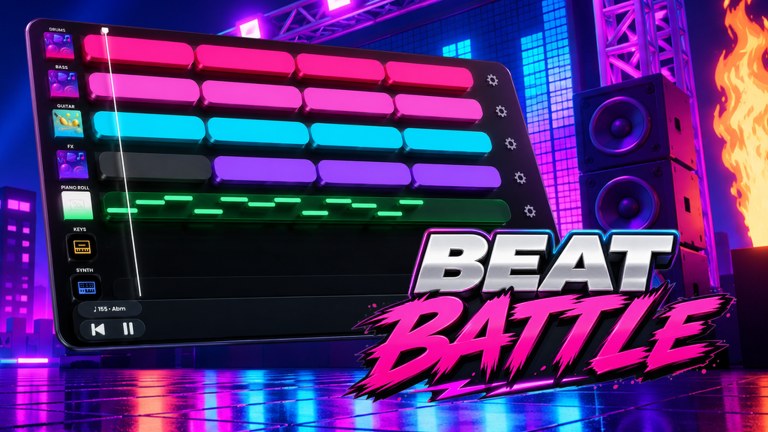
Overtune’s sequencer is the same idea as their music tools outside Roblox: lanes, a visible BPM and key, and clips you can hear immediately. Promo shots show values such as 165 BPM in A-flat minor; treat that as an example of the readout, not a locked session tempo for every server. Your first hour should happen in the studio. The stage is where a finished 8–16 bar idea gets judged. Players who queue with a one-lane drum loop lose stars because the crowd hears emptiness, not because the vote UI is broken.
The shop sits next to that studio work. Gems buy a Single Loop Box at 100, a Triple Loop Bundle at 250, and a Full Pack Crate at 1100. Cassette currency sits beside gems as a second wallet. Those numbers belong on the loop catalogue and the remix checklist as much as they belong here. This hub only reminds you that a crate is a late buy, not a tutorial skip.
The seven sequencer lanes
Every guide on this wiki talks about the same seven lanes: Drum, Bass, Guitar, FX, Piano Roll, Keys, and Synth. Drum, Bass, and Guitar are where most players paint loops. FX is seasoning, not a foundation. Piano Roll is where you write a hook in the displayed key. Keys and Synth can carry extra harmony or a lead, but they are not a substitute for a drum bed. If a page says “the sequencer,” it means this lane strip, not a hidden DAW you unlock later.
Unlocks sit around that strip. DJ Decks, stages, and effects are the long climb, ranked on the tier list and catalogued on the players hub. Production level and billboards are the public scoreboard for that climb. Share tracks when a loop stack actually sounds like a song, not when the first kick lands.
How to use this hub
Use this page as an index, not as a second getting-started article.
- If you have not joined a 25-player server yet, open Getting Started.
- If the studio and stage HUDs look like two different games, read controls.
- If your drums work and the melody does not, open the Piano Roll Guide.
- If you own loops and they fight each other, follow How to Remix Loops.
- If you already queue and still finish last, study How to Win Battles.
Promo codes are a separate check. As of September 2026 we have not confirmed working codes; the codes hub stays empty of invented strings on purpose. If you need a pre-stage punch list rather than a prose guide, keep the remix checklist open while you arrange.
What these pages refuse to invent
This hub will not teach Friday Night Funkin arrow charts. It will not pretend Beat Battles is an offline single-player DAW. It will not name loop packs, deck skins, or effect IDs that are not on the confirmed list. Shop prices, lane names, Starter Spotlights, Flame Machine, Current DJ, Retro as a sample theme, and the 100 / 250 / 1100 gem ladder are the facts we repeat because they are the facts we have.
The experience is free, released, and playable in BETA. Servers hold 25 players. You remix with other people in the same instance, then you vote. That social loop is why the guides split studio craft from stage craft instead of stuffing both into one endless page.
After you pick a child page
After any child page, come back here only if you lost the map. Otherwise keep moving sideways: studio pages link into piano roll and remixing; remixing links into winning; winning links into decks, stages, and effects. The players hub is the unlock catalogue. The tier list is the spend-order argument. The codes hub is the redemption desk for when Overtune actually drops a string.
If a heading on a child page goes deeper than this hub, treat the child as the working version of the same fact, not a different game.
Frequently Asked Questions
Quick answers for remixing, voting, and climbing Beat Battles billboards.
Which Beat Battles guide should I open first?
New accounts start at Getting Started, then controls. If you already have a loop stack, jump to How to Remix Loops or How to Win Battles.
Is Beat Battles a tap-arrow rhythm game or Friday Night Funkin?
No. Overtune built a music studio and a live remix contest. You arrange loops, write notes on the Piano Roll, and take a set on stage while other players vote in stars.
Do I need codes or scripts before I follow these guides?
No. As of September 2026 this wiki has not confirmed working promo codes or scripts. Check Codes for the live list; do not paste invented loadstrings.
What should I buy in the gem shop first?
A Single Loop Box at 100 gems, not the Full Pack Crate at 1100. Arrangement order and shop math live on How to Remix Loops and the remix checklist.
Where do unlocks and spend order live if not on this hub?
DJ Decks, stages, and effects are catalogued on the players hub and ranked on the tier list. This hub only points you there after you can finish a set.
How long should a first battle set be?
Aim for an 8–16 bar loop stack with drums, bass, and a hook, then queue. The stage page How to Win Battles covers why rambling empty repeats lose stars.