Beat Battles Discord and Community
Find Overtune’s server from the Roblox page — no fake invite codes on this wiki.
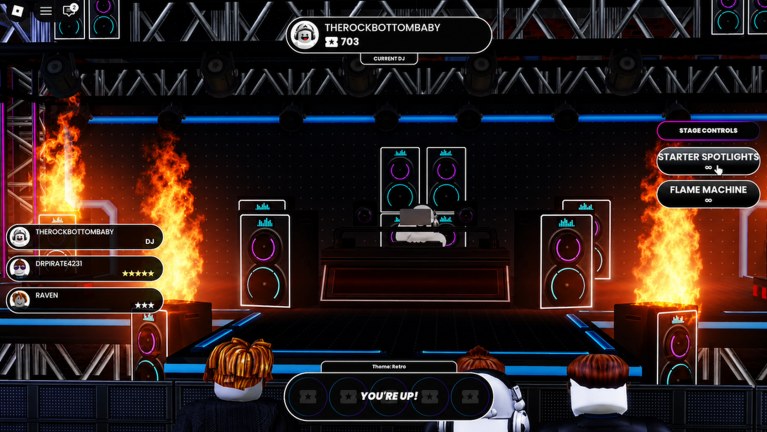
Beat Battles is a social Roblox BETA: 25 players, a live stage, and a crowd that scores the Current DJ with 1–5 stars. Discord is where that crowd talks when the server empties — codes rumours, sequencer bugs, and tracks people actually want to share. This page tells you how to find the official Overtune Discord from Roblox. It does not print an invite string. Invites expire, clones copy them, and a hardcoded discord.gg on a fan wiki becomes a phishing target the week it is posted.
The rest of the official directory lives on the Links Hub. If you only wanted the empty promo table, use where to find codes.
Find Discord from the Roblox game page
- Open the official experience: place
75605211243454(universe9800616505), creator Overtune. - On the Roblox game page, look for the social-links row. Roblox puts Discord, YouTube, X, and similar icons there when the studio configured them.
- Click the Discord icon Roblox shows. That hand-off is the one we trust.
- Confirm the server name is Overtune or clearly branded for Overtune’s Roblox work — not a generic “Beat Battle” producer contest, and not beat-battle.net.
If the social-links row is missing, Roblox sometimes hides it behind the about/store tabs or a collapsed socials menu depending on the app versus browser. Scroll the description block. The like-and-favourite CTA sits in that same description; Discord, when linked, is usually a sibling control, not a code inside the paragraph.
Find Discord from the Overtune group
The experience is owned by the Overtune group (owner account therockbottombaby). Open the group from the creator name under the game title.
On the group home, check:
- Social links configured on the group (same Discord icon pattern as the game page).
- The shout, which may say “join Discord” without being the invite itself.
- Wall posts on patch days that point back to a channel for bug screenshots.
Do not search Discord’s app discovery for “Beat Battles” and join the largest result. That search is full of rhythm-game hangouts, FNF-style servers, and web beat-battle communities that have nothing to do with this place ID. Match the studio name Overtune first, the game second.
What to use the server for
Codes. When a like-milestone or patch-day string exists, staff usually paste it in announcements faster than the Roblox description updates. Cross-check with where to find codes and redeem in-game — Discord is not the redeem UI. Until September 2026 there is still no confirmed working code; a #codes channel full of strings from other games is a clone tell.
BETA bugs. Beat Battles is a live BETA. Sequencer desync, shop purchase fails on a Single Loop Box / Triple Loop Bundle / Full Pack Crate, missing YOU’RE UP! prompts, star votes that do not land, Stage Controls (Starter Spotlights, Flame Machine) that fire for the wrong DJ — those reports help Overtune. Attach a screenshot, your platform, and whether you were in the studio or on stage. Check Updates first so you are not filing a bug that a patch already named.
Sharing tracks. The official loop includes sharing best tracks with friends. Discord is the obvious export after a billed set: drop the replay, name the key/BPM if the sequencer showed it (promo example 165 Abm), and say which lanes carried the hook (Drum, Bass, Guitar, FX, Piano Roll, Keys, Synth). Ask for mix notes, not auto-vote scripts. If you want the in-game contest side, how to win battles is the stage page; Discord is the after-party.
Looking for a group. A 25-player server is already a group. Discord is useful when you want the same DJs again tomorrow, not for buying a “private billboard.” Anyone selling ranks, gems, or tape currency in DMs is not staff.
How to spot a fake invite
Refuse a Discord that:
- Requires you to run an executor or a
.exebefore channels unlock. - Promises a Full Pack Crate or admin deck for a boost.
- Uses Beat Battle, BeatBattle, or beat-battle.net branding without Overtune.
- DMs you a loadstring “for auto 5-star votes.” That wrecks the mode; see Scripts.
- Asks for your Roblox password to “link roles.”
A real community server can still have fan channels, clip showcases, and off-topic chat. The test is whether you arrived from the Roblox social link and whether moderators tell you to redeem codes in-game rather than in a bot’s DM.
This wiki will not keep a backup invite “just in case.” When Roblox shows a new icon, that is the update. Bookmark the Links Hub for the play URL, then this page for the Discord habit — always start from Overtune’s Roblox presence, never from a search ad.
Once you are in, mute noisy bots, read announcements, and take bug reports to the right channel instead of the stage chat while someone is mid-remix. The sequencer still needs you more than the sidebar does.
Frequently Asked Questions
Quick answers for remixing, voting, and climbing Beat Battles billboards.
What is the official Beat Battles Discord invite?
We do not publish an invite code. Open the Discord icon on the official Roblox game or Overtune group page. Starting from Links keeps you off clone servers.
Why won't this wiki paste discord.gg/… ?
Invites expire and phishing servers copy them. A fan page that hardcodes a code becomes the scam. Always originate from Roblox social links.
Can I get codes from Discord?
If Overtune posts a string in announcements, yes — then redeem in-game. Confirm rumours on where to find codes. There are still no confirmed working codes as of September 2026.
Should I report BETA bugs on Discord or in-game?
Use the official server’s bug channel with screenshots, and check Updates so you are not duplicating a known sequencer or stage issue.
Is a huge “Beat Battle” Discord the same community?
Usually not. Match Overtune and place 75605211243454. Web producer contests and tap-arrow games reuse the phrase and will not help you win star votes. For stage craft see how to win battles.
Staff asked me to run a script to verify. Is that normal?
No. Real staff will not require an executor. That pattern is covered on Scripts. Leave the server and re-enter from the Roblox icon.