Getting Started in Beat Battles
Join a live BETA server, finish one short loop stack, and take it on stage without wasting gems.
Beat Battles is already live on Roblox as a free BETA from Overtune in Iceland. You are not waiting for a launch, and you are not installing a tap-arrow rhythm client. You join a 25-player server, open a music studio, build a short remix, then take that remix onto a stage while the rest of the server votes in stars. This page is the first session only: find the two spaces, finish an 8–16 bar loop stack, protect your gems, queue, and vote. Deeper lane writing lives on the Piano Roll Guide. Arrangement order lives on How to Remix Loops. Stage craft lives on How to Win Battles. HUD literacy lives on Beat Battles Controls.
Join a 25-player BETA server
Open the official Beat Battles experience and land in a server that can hold 25 players. That number matters. You are sharing one instance with a crowd that will later hear your set and assign stars, so the first session is social even when you are still in the studio. Voice chat is not the point of the onboarding; the sequencer and the stage HUD are.
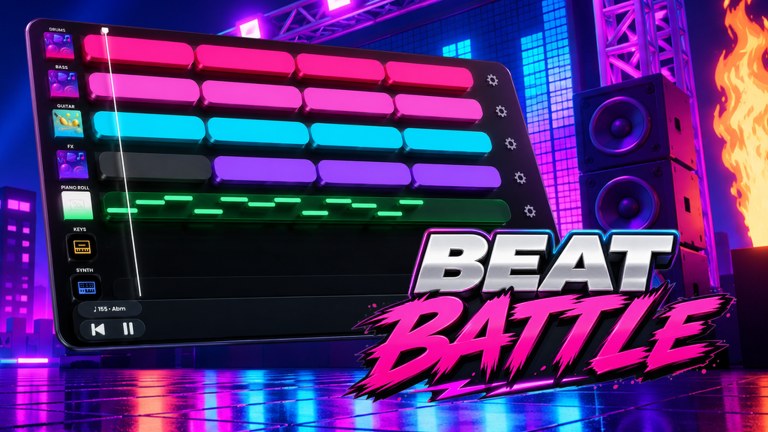
Walk the space once before you buy anything. You are looking for two jobs, not one giant menu. The studio is where the seven lanes live: Drum, Bass, Guitar, FX, Piano Roll, Keys, and Synth. BPM and key sit on that surface — promo shots show examples such as 165 in A-flat minor — so you can see whether a clip belongs in the current project. The stage is the performance floor: Current DJ, a posted theme such as Retro, a YOU’RE UP! prompt when the queue reaches you, star votes from the crowd, and Stage Controls that include Starter Spotlights and the Flame Machine.
If you cannot tell those two spaces apart yet, stop and read Beat Battles Controls before you spend gems. Buying loops into a project you cannot navigate is how first sessions stall.
Make an 8–16 bar loop stack, not a novel
Your first finished object is a short loop stack, not a three-minute album. Eight to sixteen bars is enough for a crowd to hear a drum bed, a bass motion, and one hook. Longer empty repeats do not sound ambitious; they sound unfinished.
Start on Drum. Drop a loop that states kick and snare clearly for the full 8–16 bars. Add Bass next so the low end moves with that kick instead of drifting. Add Guitar third if you have a clip that sits in the displayed key. Leave FX for last, and leave it thin. The Piano Roll lane is where you write a hook in key rather than painting another loop; even a short four-bar figure is enough for a first battle. Keys and Synth can wait until the bed is solid. If you want the writing rules now, jump to the Piano Roll Guide. If the clips you own fight each other, jump to How to Remix Loops.
Play the stack from the top without touching the timeline. If you cannot hum the hook after one pass, the set is not ready. If drums drop out for four bars in the middle, the crowd will vote that hole, not your tasteful pause.
Do not dump gems on the Full Pack Crate
The shop prices are public and easy to misread as a tutorial skip. A Single Loop Box costs 100 gems. A Triple Loop Bundle costs 250 gems. A Full Pack Crate costs 1100 gems. Cassette currency sits beside gems as a second wallet. None of those products replace a finished 8–16 bar idea.
Day one, buy at most one Single Loop Box if your Drum or Bass lane is empty. The Triple Loop Bundle is the better volume buy later because three singles would cost 300. The Full Pack Crate is a catalogue dump for players who already know which lanes they are filling. Spending 1100 gems before you have queued once trains you to collect clips instead of finishing sets.
The loop catalogue is the place to study what those boxes can add. This page only sets the spend rule: finish a stack with what you have, then buy a box that fills a silent lane, then queue. Check Codes if you want a promo string; as of September 2026 this wiki has not confirmed any working codes, and we will not invent one so you can feel like you redeemed something.
Queue, play when YOU’RE UP!, then vote
When the stack plays clean, queue for the stage. Watch Current DJ and the posted theme. If the theme is Retro, your set should feel like it belongs in that room even if you built it in the studio with whatever loops you owned. Do not wait until you are already under the YOU’RE UP! prompt to rewrite the guitar lane.
While you wait, listen to the current DJ. That is rehearsal for voting and for hearing how long a set should last. When the HUD says you are up, play the stack you already finished. Use Stage Controls lightly if you touch them at all on the first set — Starter Spotlights and the Flame Machine dress a performance; they do not fix a missing bassline. After you leave the stage, vote other DJs in stars. A 25-player server remembers who never votes and who only tanks rivals. The politics of that crowd are covered on How to Win Battles; the day-one rule is simpler: vote every set you actually heard.
After the first battle
Do not immediately buy the crate because you lost. Open the stack, fix the quietest lane, and queue again. If the melody was the hole, write a shorter Piano Roll hook in the displayed key. If the bed was the hole, replace Drum or Bass before you touch FX. If the crowd ignored a long intro, cut the intro.
Unlocks — DJ Decks, stages, effects — sit behind production level and billboard climb, not behind a single lucky crate. Track BETA changes on BETA notes before you assume a shop price or HUD label moved. Share a track only when the 8–16 bars sound like a song you would vote for if someone else played it.
First-session checklist
- Join a live 25-player server and find studio versus stage.
- Read BPM and key on the sequencer so new clips have somewhere to sit.
- Paint Drum, then Bass, then Guitar; keep FX thin.
- Write a short Piano Roll hook in key, or skip Keys and Synth until that hook exists.
- Spend gems on a Single Loop Box only if a foundation lane is empty — never on the Full Pack Crate first.
- Queue, match the posted theme, play when YOU’RE UP!, then vote in stars.
- Fix the weakest lane and queue again instead of shopping as a coping habit.
That is the whole first hour. Everything after it is craft, spend order, or stage presence, and those pages are already linked above.
Frequently Asked Questions
Quick answers for remixing, voting, and climbing Beat Battles billboards.
Is Beat Battles released, or am I still waiting for a launch?
It is released and playable as a free Roblox BETA from Overtune. You join a 25-player online server today; this page is not a pre-release checklist.
How long should my first loop stack be?
Eight to sixteen bars with Drum, Bass, and a hook. Longer empty repeats lose stars. Arrangement detail is on How to Remix Loops.
What should I buy with my first gems?
A Single Loop Box at 100 gems if a foundation lane is empty. Skip the Full Pack Crate at 1100 until you have finished and queued a set. See the loop catalogue.
Are there working codes I should redeem on day one?
As of September 2026 we have not confirmed active promo codes. Bookmark Codes and ignore invented strings.
Where do I learn the studio and stage HUDs?
Use Beat Battles Controls for lanes, shop, Current DJ, YOU'RE UP!, and Stage Controls. Come back here for the session order.
What do I do after my first battle?
Fix the weakest lane, then read How to Win Battles and check BETA notes before you assume the shop or HUD changed.