Beat Battles How to Redeem Codes
Settings, shop, or HUD — and what to do if BETA moves the button.
Beat Battles does not currently show a confirmed Codes button, because no promo string has been verified as of September 2026. This page is still the redeem playbook: when Overtune adds a field, you should already know where to look, how to type the string, and which errors are normal. Do not wait for a random video to invent a Twitter bird icon that is not in the BETA HUD.
If you only needed the empty working list, go back to the Codes Hub. If you do not know where a future string will be posted, use where to find codes.
Before you hunt for a button
Join the live experience on Roblox (place 75605211243454, 25 players per server). Wait until the studio and stage finish loading. A codes field will not appear on the Roblox website, in the group shout, or in a Discord chat box. You redeem inside the running place, on the same account that should receive gems or loops.
Have the code copied to your clipboard before you open menus. BETA UI can close if you alt-tab to retype a string. Do not paste a loadstring, a private-server link, or a “free gem” website into a codes box — those are not promo codes. For executor noise, see the Scripts Hub instead of this page.
Likely homes for a Codes button
Until Overtune pins the control, check these three places in order. They are the usual Roblox homes, not a screenshot we are pretending exists.
- Settings / gear. Open the pause or settings panel. Scan for Codes, Redeem, Promo, or Gift. Some music games hide it under a nested tab rather than the first page of volume sliders.
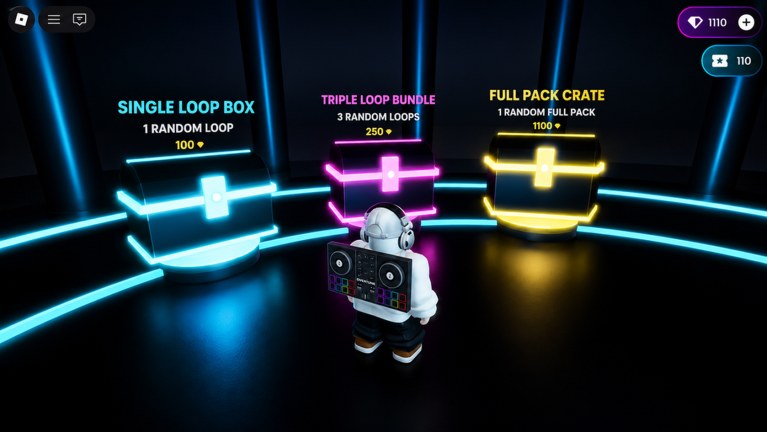
- Shop. The loop shop already sells Single Loop Box (100 gems), Triple Loop Bundle (250), and Full Pack Crate (1100). A Codes field often sits on that same panel because the reward is gems or loops. Look near the purple gem balance and the cassette/tape balance, not only on the crate cards.
- HUD. Check corners and the top bar while you are in the studio (Drum, Bass, Guitar, FX, Piano Roll, Keys, Synth lanes visible) and again while you are in the crowd watching the Current DJ. A small ticket, gift, or Twitter-style icon is the common pattern.
If none of those three show a field, the BETA simply has not shipped codes yet. That matches the empty hub. Do not reset your account or buy Robux hoping to “unlock” redeem.
Step-by-step when a field appears
- Copy the code from an official source listed on where to find codes — Roblox description, Overtune group, or Discord — not from a compilation thumbnail.
- Join a live server and stay until your gem and tape balances are visible so you can see a grant.
- Open settings, shop, or the HUD control as above.
- Click the text box. Clear any placeholder such as “Enter code…” so you are not submitting the hint text.
- Paste the string. Do not add spaces before or after. Do not “fix” capitalization.
- Confirm with Redeem, Submit, or Enter.
- Read the toast or modal. Success should mention gems, loops, a pack, or tape. Then close the menu and check the shop balances and the loop catalogue.
- If nothing changed, rejoin once. BETA can delay inventory replication on a full 25-player server.
You do not need to be the Current DJ, you do not need YOU’RE UP! on screen, and you do not need to fire Starter Spotlights or the Flame Machine to cash a code. Redeem is account-side, not stage-side.
Case sensitivity, spaces, and look-alike characters
Roblox promo codes are usually case-sensitive. Like10k and LIKE10K are different strings. If a post shows all caps, type all caps. If it shows a mix, keep the mix.
Spaces matter. A trailing space from a messy copy is the most common “invalid” error. Hyphens and underscores also matter; do not turn BEAT-BATTLES into BEATBATTLES unless the official post did.
Watch look-alike characters: capital i versus lowercase L, zero versus O. If a code fails once, re-copy from the source instead of guessing. We will never list a “close enough” variant on this wiki.
Expired, invalid, and already redeemed
Typical Roblox messages, even when the exact wording differs in BETA:
- Expired — the window closed. Like-milestone codes often die after a few days. Stop retrying; check Updates and BETA notes to see if a replacement dropped with a patch.
- Invalid / not found — wrong game, typo, or a fake list. Beat Battles is not a tap-arrow rhythm title. Codes from other remix games will not grant loops here.
- Already redeemed — this account already took it. Codes are almost always once per account, not once per server.
- Try again later — the redeem endpoint hiccupped. Wait, then submit once more. Spamming the button can lock the modal.
None of those errors mean your loops vanished. Open the shop and confirm the gem count before you buy a Full Pack Crate in a panic.
If the BETA moves the button
Overtune can relocate HUD chrome without a marketing post. After a patch:
- Re-check settings, shop, and HUD in that order.
- Look at BETA notes for a one-line “Codes moved to …” mention.
- Open controls if the gear icon or shop hotkey changed.
- Ask in the official community linked from Discord rather than downloading a “codes GUI” executor.
Do not follow a YouTube overlay that still points at an old corner. The live client is the source of truth. If the field vanishes entirely, treat codes as disabled again and keep this page for the next drop.
After a successful redeem
Spend the grant on purpose. A small gem dump is usually enough for a Single Loop Box or a Triple Loop Bundle; it is rarely enough for a Full Pack Crate unless the reward is huge. New loops still have to be placed on lanes and arranged before they help you on stage. Redeeming does not skip star votes, billboards, or production level.
If the reward is tape/cassette currency rather than purple gems, do not convert it in your head to crate prices. Wait until the shop UI shows what tape actually buys. This wiki will not invent a tape SKU.
Log out of shared computers after you redeem. A codes box is not a password field, but phishing sites love to sit next to “free code” search results. Official sources only — then back to the sequencer.
Frequently Asked Questions
Quick answers for remixing, voting, and climbing Beat Battles billboards.
Where is the Beat Battles codes button?
There is no confirmed button yet because there are no confirmed codes. When one appears, check settings, the loop shop, and the HUD. Details stay on this redeem guide.
Are Beat Battles codes case sensitive?
Treat them as case sensitive and do not add spaces. Paste from the official post listed on where to find codes instead of retyping from memory.
What does an expired code error mean?
The string is real but the window closed. Stop retrying and read BETA notes for a replacement. Expired is not the same as a typo.
The HUD changed after a patch. Where did Redeem go?
Re-scan settings and shop, then check controls if hotkeys moved. Patch write-ups live on BETA notes.
Do I need to be on stage to redeem?
No. You do not need YOU'RE UP!, star votes, or Stage Controls. Redeem on the loaded account, then return to the Codes Hub to confirm we listed the same reward.
Can I redeem on the Roblox website?
No. Promo codes for this experience will be in-game. The website description is a source for the string, not the redeem form.